Encrypting an E-mail and Adding a Digital Signature (S/MIME)
About S/MIME
If S/MIME is installed in your environment, you can configure its settings on this machine.
S/MIME is one of the E-mail encryption schemes. Using S/MIME encrypts an E-mail sent from this machine, preventing a interception by third parties during sending. Adding a digital signature to an E-mail provides assurance regarding the authenticity of the sender, and certifies that no data has been falsified.

To use this function, an option is required. For details on the required option, refer to Here.
Preparation required to use this function (for the administrator)
Configure settings to use S/MIME.
For details on the setting procedure, refer to Here.
Operation flow
Load the original.
Display the Scan/Fax screen of classic style.
For details on how to display the screen, refer to Here.
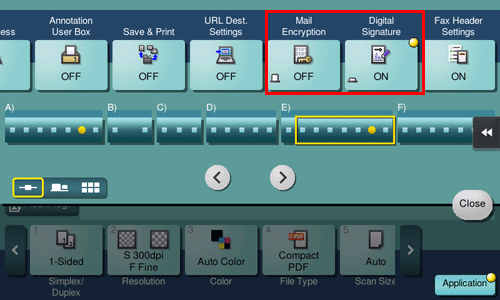
Specify [Application] - [App] - [Mail Encryption] and [Digital Signature].
To apply E-mail encryption, set [Mail Encryption] to [ON].
To add a digital signature, set [Digital Signature] to [ON].
If you cannot change the [ON] or [OFF] state in [Digital Signature], it is assumed that whether or not a digital signature is always added is specified by the administrator.
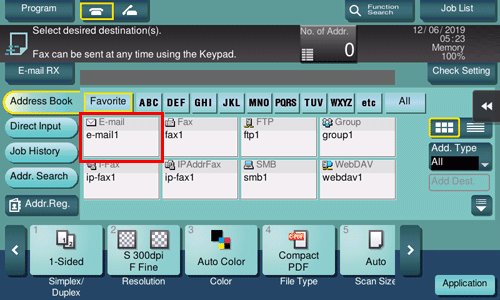
Specify the E-mail address of the destination.
To encrypt an E-mail, select an E-mail address with the certificate registered. An E-mail address with the certificate registered is marked by the key-shaped icon.
Up to 10 E-mails can be broadcast.
Use the Start key to start transmission.
If necessary, tap [Check Setting] before transmission, and check the specified destination and settings.
Using the Stop key enables you to stop scanning the original. A list of the currently stopped jobs is displayed. To stop transmission, select the target job from the list, and delete it.